Review, file, and track UIs/MUIs as an admin
The admin side of incidents: a deadline-sorted review queue, filing UI/MUI reports in DODD-expected formats, and the one-click Annual MUI Analysis.
Directors, Admins, Super Admins, or flagged Managers work the review queue — MUIs first, then by deadline — confirming each incident's UI, MUI, or Internal classification. Finalize & File locks the report, but never auto-notifies the county board; the admin sends it with Send Report. A one-click Annual MUI Analysis compiles the year's MUIs into the required PDF.
When a staff member files an incident, it lands with you. This guide covers the administrator's side: working the review queue, filing UI and MUI reports in the formats DODD and your county board expect, and running your Annual MUI Analysis. The staff-facing filing steps are in Report an incident: the 3-step wizard.
Work the queue by deadline
Every submitted incident flows into the review queue, organized into status tabs: My drafts, Pending review, Filed, Closed, and All. The queue puts MUIs first, then the most urgent deadline, so the item that most needs your attention sits at the top — you always see it without hunting for it.
- Each incident carries a live deadline badge —
UPCOMING,APPROACHING,BREACHED, orSATISFIED— recomputed from the discovery date the reporter entered. - Work
Pending reviewfrom the top down and nothing quietly ages past its window. - You'll only see the queue if you're a reviewer: a Director, Admin, or Super Admin, or a Manager flagged to receive incident alerts. When a report is submitted, reviewers are auto-emailed.
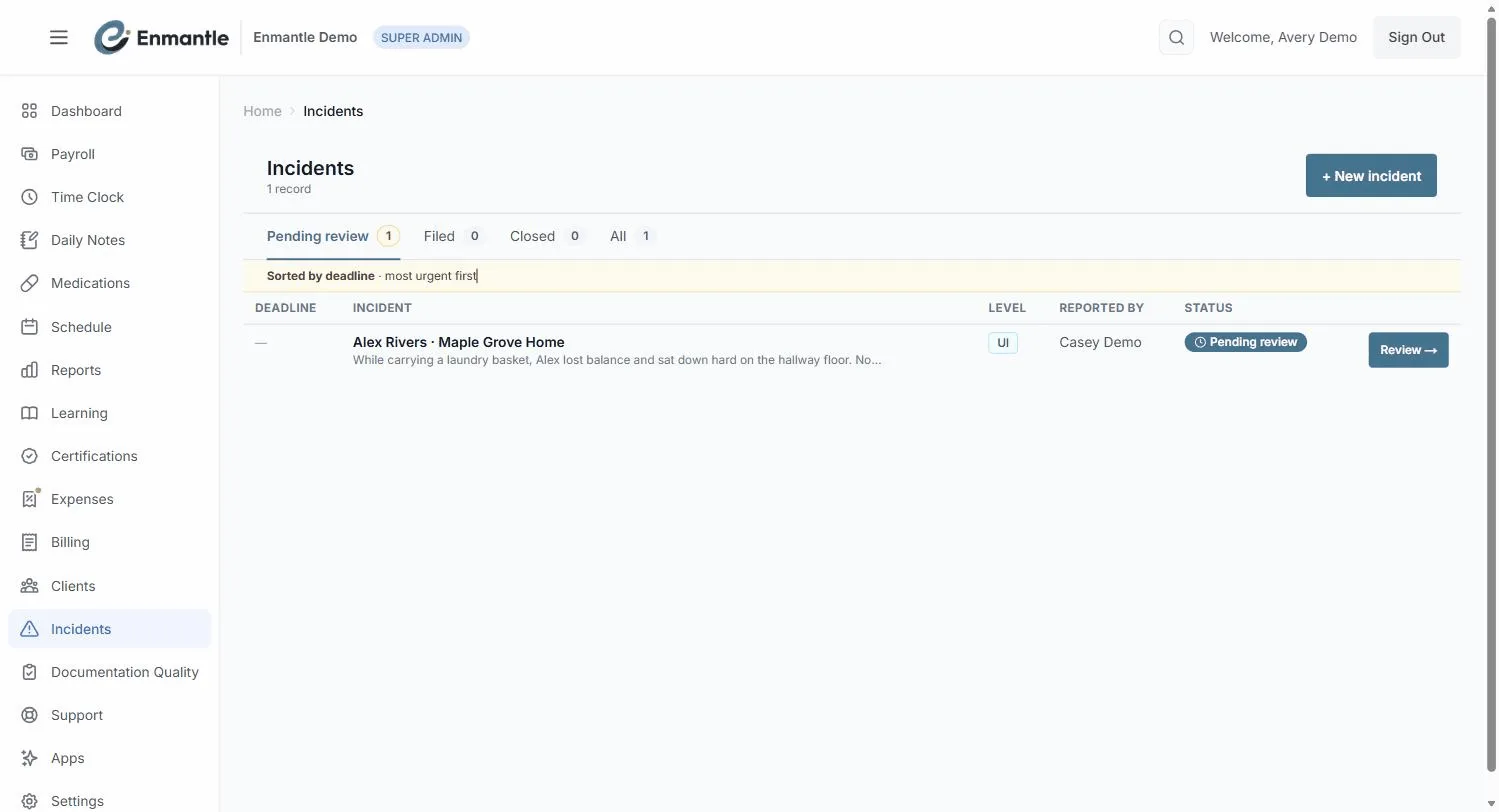
Open an incident to review the description, the photos, and the details the reporter submitted, then decide how it's classified and reported.
UI vs. MUI
The reporter sets a first-pass classification; you confirm or correct it on the Incident level * control, which has three options:
UI (Unusual)— "Internal tracking".MUI (Major)— "State-reportable", carrying stricter reporting and timelines. Choosing MUI reveals anMUI category *(A, B, or C) and anMUI type *.Internal— "Provider-only matter", tracked but not reported out.
Only an MUI with a category runs deadlines; UI and Internal incidents don't. Set the level and Enmantle produces the corresponding report.
File in DODD / county-expected formats
You don't rebuild these reports by hand. Enmantle generates UI and MUI reports that match the formats DODD and county boards expect, populated from what was filed in the wizard. That means the report you submit lines up with what your county board is looking for, instead of a home-grown document you have to reconcile.
- Open the incident from
Pending review. - Confirm the
Incident level *(and MUI category/type) and review the populated report. - If something's missing, use
Request Clarification→Send back to reporterto bounce it back for a fix, rather than guessing. - When it's right,
Finalize & File— this locks the report so it can no longer be edited. From there you canDownload PDF, orSend Reportto email the county board, a guardian, or a custom recipient.Close Incident,Duplicate, andDelete Drafthandle the rest of the lifecycle.
Filing does not auto-notify the county board or guardian.Finalize & Filelocks the record and emails your reviewers, but external notifications are on you — record or send them yourself withSend Report. This matters most for the incidents on OAC 5123-17-02's four-hour list (abuse, neglect, exploitation, misappropriation, peer-to-peer acts, prohibited sexual relations, unexplained death, and media inquiries), where the verbal county-board clock is only four hours from discovery; every MUI's written incident report is due by 3 p.m. on the first working day after discovery.
Because reports are generated from the original submission, keep the source clean: an accurate discovery date and complete details in the wizard mean less rework here. Coach your staff to report promptly and thoroughly.
Track to completion
The queue is also your tracking view — an incident stays visible against its deadline until it's fully handled, so nothing falls through between submission and closure. For a full history of who did what and when on any record, see Trace changes with the audit log.
One-click Annual MUI Analysis
Once a year, providers owe the county board an analysis of their MUI trends. The Annual MUI Analysis card spells it out: "Required by OAC 5123-17-02. Due to the county board by February 28 for the prior calendar year."
Enmantle builds it in one click. Because every MUI you filed through the year is already structured data in the system, Enmantle assembles the analysis from those records instead of you compiling a year of incidents by hand.
- On the
Annual MUI Analysiscard, pick the year from the year picker and tapGenerate PDF. - Review the output before you submit it to the county board.
If you'd rather not wait until February, you can also schedule recurring incident reporting so trends surface throughout the year — see Schedule a custom report.
Deadlines and definitions above are stated as the rule states them; the rule text on codes.ohio.gov is the authority. Enmantle's own defaults are labelled as defaults.
Still stuck?
Email support@enmantle.com — a real person replies.