Ohio DODD billing software: eMBS, HPC, ADS and NMT in one close.
Billing on Enmantle isn't separate data entry — verified clock data becomes billing rows automatically, a Setup step flags what needs attention before you promote it, and the eMBS invoice is generated from rows you've already reviewed. HPC, ADS, NMT transportation, and remittance reconciliation all run through the same close.
Last reviewed · Enmantle team
What does the billing workflow do?
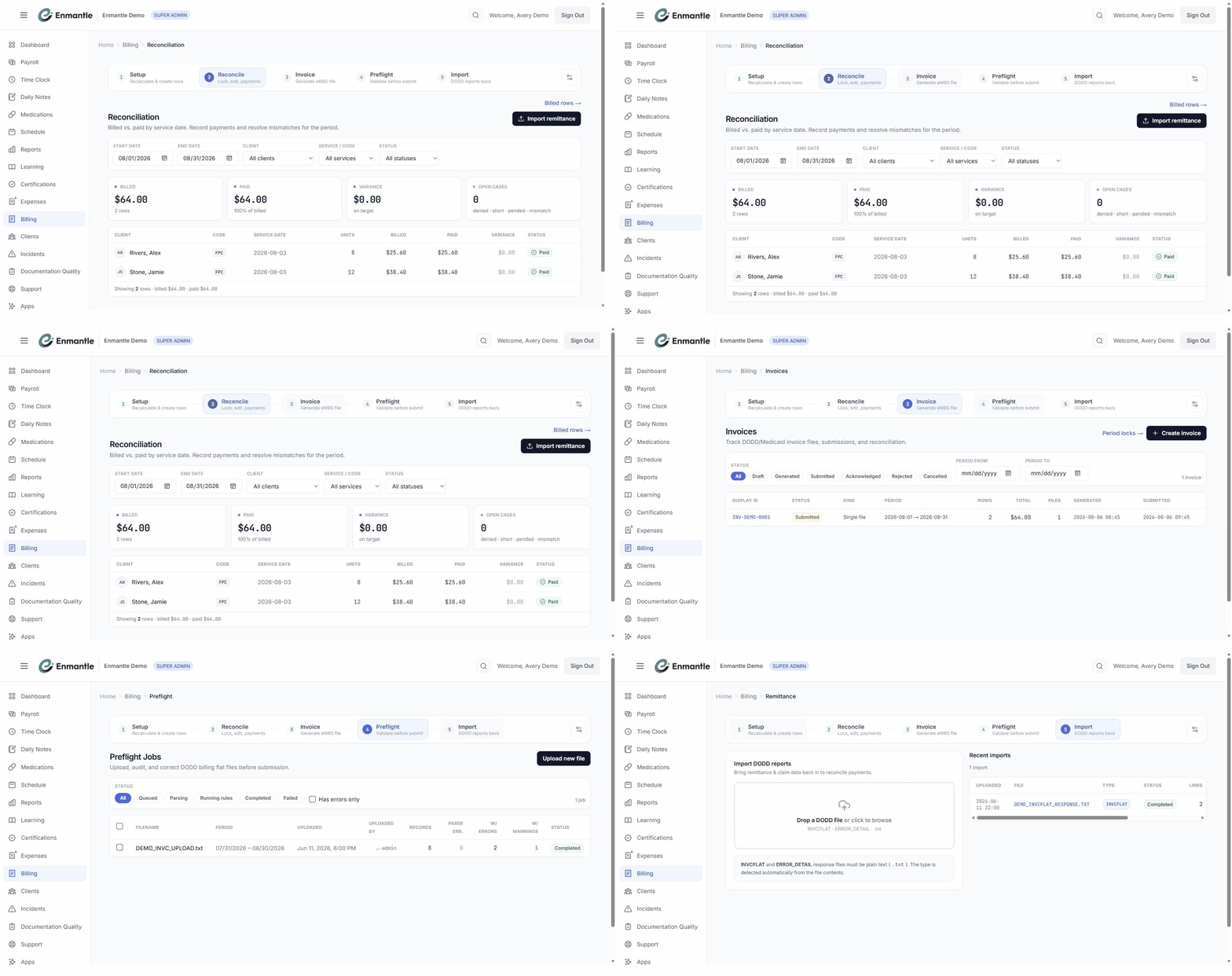
Enmantle derives billing rows automatically from the clock data your staff already create every shift, then walks them through a Setup, Invoice, Preflight, and Reconcile flow — plus remittance import — so a shift becomes a clean eMBS claim without a second round of data entry.
On Setup, every derived row gets a status: PASS is ready to promote, WARNING flags something to check — a missing daily note, a note with no linked ISP goal status, an EVV visit that isn't verified, or no authorization on file — and UNBILLABLE is a hard error like an unresolved rate or billing code. Filter chips let you work the problems first, then Recalculate and Create Billing Data to promote the clean rows. On Invoice, Enmantle assembles the DODD/Medicaid flat file from the reviewed rows, scoped to a period and optionally filtered by client, service category, or cost center; Preflight audits the generated file before you submit.
How do authorizations, rates, and transportation fit in?
Every billable shift draws down a service authorization — the units DODD has approved for that client, tracked as budget lines with units used, units remaining, and a percent-remaining bar. The Budget Alerts page lists authorizations across every client that are expiring, low on units, or carrying stale data, so a shortfall is a phone call to the case manager instead of a denied claim.
Behind every row, Enmantle also maintains the reference data that rates and codes it: Cost Centers scope the funding source (Medicaid waiver, county board, private pay), platform-managed Rate Tables cover HPC, HPC Transport, ADS/VocHab, NMT, and more, a Service Crosswalk maps each service to a billing code, and the Code Library validates it against DODD's catalog. You maintain the cost centers; the rates, crosswalk, and code library stay current on their own.
Transportation bills the same way. An ad-hoc trip is logged from the shift's Transportation Log dialog with the right Trip Purpose — HPC transportation, NMT per trip, or NMT per mile — vehicle details, and odometer readings. For trips that repeat, an admin can set up a transport route with riders, a vehicle, days of the week, and a billing lane; Enmantle generates a daily run for each scheduled day, and a driver claims and logs it much like an ad-hoc trip, with the details prefilled from the route.
Import remittance and reconcile
When DODD reports back, the Reconcile step imports the remittance file — an INVCFLAT or ERROR_DETAIL .txt — and matches each claim line to what you submitted, updating Billed, Paid, Variance, and Open cases tiles. Each row lands in a payment status you can filter by: Paid, Short, Denied, Pending, Mismatch, and closed-out outcomes like Zeroed or Recouped.
Working Open cases down to zero is how a billing cycle actually finishes: a denial's DODD reason code usually traces back to a fixable source problem — a missing note, an unresolved EVV visit, or units beyond the authorization — so you correct the record and re-bill on the next invoice rather than writing the claim off.
How it works in Ohio
DODD claims must match a PAWS authorization and be submitted within 350 days of the date of service. Claims are submitted in eMBS in weekly cycles. Ohio's EVV rules require electronic visit verification for services including homemaker/personal care, participant-directed HPC, residential respite billed in fifteen-minute units, and waiver nursing delegation and service on the IO, Level 1, and SELF waivers — and Enmantle is a DODD-approved alternate EVV vendor and submits directly to Sandata, so a verified visit and a billing row are drawn from the same record rather than reconciled after the fact.
A day with it
On a Friday, a billing coordinator opens Setup for the week's shifts. Most rows show PASS; a handful show WARNING because a daily note wasn't submitted yet or an EVV visit hasn't verified. They chase down the missing notes, wait for the last visit to verify, hit Recalculate, and promote the clean batch with Create Billing Data. On Invoice, they generate the eMBS file for the week, scoped to their standard cost centers, and run Preflight before submitting — it catches one row with units past the client's authorization, which gets split against a second authorization line before it goes out.
The following week, DODD's remittance file comes back. The coordinator imports it on Reconcile; the tiles show most of the week paid in full, with a few rows sitting in Open cases — a short pay and a couple of denials. Both denials trace to the same cause, a lapsed GPS consent that's since been renewed, so the coordinator corrects the visits and queues them for the next invoice instead of writing them off.
Screens
Frequently asked questions.
Do we have to re-enter shift data to build a bill?
Setup step that flags anything needing attention before you promote it — there's no separate spreadsheet to build or reconcile.What happens when a client runs low on authorized units?
Budget Alerts page flags it across every client — expiring authorizations, low units remaining, or stale data — before it becomes a denied claim. On the Setup step, billing past the units left is flagged as a denial risk so you can fix it before the invoice goes out.How does HPC transportation differ from NMT in billing?
Transportation Log dialog but bill differently: HPC transportation is part of a Homemaker/Personal Care shift, while NMT is its own service, billed either per trip or per mile based on odometer readings. Picking the right purpose keeps the two apart the way a county board expects.Do rate tables and billing codes need to be kept up to date manually?
What happens when DODD denies or short-pays a claim?
Open case with a status like Denied or Short, along with DODD's reason code. Most trace back to a fixable source problem — a missing note, an unverified visit, or units past an authorization — so you correct the record and re-bill on the next cycle.- From clock-ins to a clean eMBS invoiceFollow the billing flow end to end: clock data becomes billing rows, preflight flags problems, and you generate an eMBS invoice you can trust.
- Authorizations and units: keeping shifts billableService authorizations are the budget behind every billable shift. See how units track, how budget alerts warn you early, and why a row turns UNBILLABLE.
- Importing remittance and reconciling paymentsWhen DODD reports back, import the remittance on the Reconcile step to match payments to what you billed and clear denials, short pays, and mismatches.
- Cost centers, rate tables, and the code libraryThe reference data behind billing: cost centers scope funding, rate tables set price, the crosswalk picks the code, and the code library validates it.
- Logging HPC transportation vs. NMTWhen to use HPC transportation versus NMT, how to log a trip on the shift, and how per-trip and per-mile both flow into billing.
- Setting up transport routes and vehiclesBuild recurring transport routes with riders, a vehicle, and a billing lane. Runs generate automatically; a missed-run panel catches the ones nobody drove.
— See it on your workflow —
See a shift become a paid claim.
A 30-minute demo turns a real shift into an eMBS invoice and a reconciled remittance, mapped to your cost centers and rates.